Showing posts with label Apps. Show all posts

Sunday, September 15, 2013

Memory Booster - RAM Optimizer

Memory Booster
Description
Memory Booster is a powerful mobile memory & RAM boosting tool specially designed for Android smartphone and tablet users. It is designed to tackle the difficult yet crucial problem of memory management for all Android devices. Memory Booster reclaims lost memory for your programs by defragmenting your smartphone's memory and recovering memory leaks from poorly behaved applications.
Supported languages: English, Korean, Japanese, Traditional Chinese, Simplified Chinese, Italian, French, Russian, Spanish, German, Turkish
Features:
* Real-time Memory Status Report & Monitor
Memory Booster provides a live chart to demonstrate your device's total/free memory and current memory usage.
* One-click Quick Memory Boosting
Besides automatic memory boosting, Memory Booster also allows you to manually boost your memory by Quick Boost.
More features in upgraded version:
* Setting Your Performance Target
With Auto Boost Threshold set, Memory Booster keeps your memory higher than desired level, and act immediately if memory drops down.
* Auto-boosting in the Background
With Auto Boost Interval, Memory Booster runs in the background and automatically reclaims memory for your Android at interval.
* Android system crash protection
Memory Booster always watches your system resources and cleans up system memory once it reaches a critical point.
* And there is more..
Other features include embedded Task Killer, Whitelist Manager, Boost Level Manager & Memory Boost Log, which assist Memory Booster to perform more efficiently and friendly.

Screenshots:
Memory Booster

Memory Booster


To Download this App: CLICK HERE


Thursday, September 5, 2013

Backgrounds and Wallpapers HD

Description
## Unique & Superb quality Wallpapers Hand Picked by OGQ ###

The OGQ Backgrounds HD has huge selections of unique and high quality images with category support. It is the Fastest Wallpaper app with easy and intuitive user interface.

** Features **
✔ 2,500+ Unique & High quality images Hand Picked by OGQ
✔ New Unique & Superb quality Images added Daily
✔ The Fastest Wallpaper app with easy and intuitive user interface
✔ Search wallpapers by category, popular, favorite features
✔ Easy to share beautiful images through SNS such as Facebook, Twitter

** Wallpaper Categories **
The OGQ HD Wallpapers includes Animal, Buildings, Cats and Dogs, Cars, Colorful, Flowers, Food, Girly, Heart, Illustration, Love, Monochrome, Nature, Paintings, Patterns, People, Pink, Quotes, Sky, Sports, Texture, Travel, Trees, Universe, Vintage and s going to continue to be added.

The OGQ HD Wallpapers and Backgrounds is the best Android Wallpaper app, which is also known as Wallpapers, Wallpaper, Backgrounds, Live Wallpaper, beautiful images, photos, pictures, and artist drawings.

Screenshots:


To Download this App: CLICK HERE


Friday, August 30, 2013

Holo Launcher

Description
Simple, powerful, fast and highly customizable home replacement, based on Android 4.0.4 ICS Launcher.
Not like Apex Launcher or Nova Launcher, Holo Launcher can run on Froyo, Gingerbread, ICS and Jelly Bean.
Basic Features:
- Full ICS Style: ICS Icons, Folders, Outlines, Drawer Tabs, etc.
- Custom Desktop Pages/Grid: Up to 9 desktop pages and 10 x 10 grid.
- Custom Drawer Portrait/landscape Grid
- Scrollable Dock: Up to 7 icons per page and up to 3 pages.
- Infinite Scrolling
- Gestures: Swipe up/down on desktop to launch apps quickly.
- Customizable shortcut/folder icons
- Customizable icon label color
- Apply icon packs, support ADW icon pack and Launcherpro icon pack.
- Desktop Previews: Pinch to access desktop previews.
- Backup and Restore: Backup and restore your settings and shortcuts.
- Other Customization Options: Keep in memory, home key action, hide apps in drawer, hide labels, etc.
Plus Features (Need Holo Launcher Plus):
* Unlimited configurable drawer tabs
* Unread count notifications for call, sms, gmail and K-9 mail
* Customizable notification badge color
* More desktop gestures: Pinch in/out, Two Finger Swipe and Double-tap
* Dock icon Swipe up/down gestures
* Support Go Launcher icon pack
* More transition effects
* Widgets overlapping
* 1x1 widgets in dock
* Other enhancement and customization options

Screenshots:


To Download this App: CLICK HERE



Wednesday, August 28, 2013

VEVO - Watch Free Music Videos on your SGY


Description
With the VEVO app you can watch music videos, stream live concerts, and discover new artists on your Android device for free! Access VEVO's entire catalog of 75,000 music videos from more than 21,000 artists including Taylor Swift, Justin Bieber, One Direction, Rihanna, Nicki Minaj, and more!
VEVO TV is a 24/7 channel of music videos, live performances, and original shows from VEVO’s massive library - made by music lovers for music lovers, no algorithms allowed. Turn it on, relax and enjoy a full HD music experience that covers everything from the latest premieres to the best classics. Pop, rap, rock, R&B, country – the choices are endless. See a video you like, but don’t have time to check it out? Save the video to your Watch Later Playlist. VEVO TV: Always On.
Download VEVO now and join the millions who are already experiencing high-quality music videos from VEVO while on-the-go. VEVO for Android will work over cellular (3G or LTE) network connections, but for the highest quality music video experience, we suggest accessing via Wi-Fi whenever possible.
Features:
* Exclusive HD music videos, premieres, top charts, top playlists, artists on tour & VEVO original music programming
* VEVO TV: Always on sit back watching experience
* Share any video easily with friends via Twitter & Facebook
* Purchase your favorite music on the go
* Use Voice Control to search your favorite artist and/or song
* Facebook Friends page where you can see all the great playlists your friends make and invite them if they aren't on VEVO yet
* Continuous play to serve you recommendations for videos that will play automatically to keep the music videos flowing in a dynamic and personalized style
PLEASE NOTE: Due to the nature of some licenses from the content owners, Features and Videos may not be available in all regions.
Twitter: @VEVO
Facebook: Facebook.com/VEVO
Instagram: @VEVO
Learn more at VEVO.com and tell us how we can make this app rock for you at mobile.feedback@vevo.com.
About VEVO
VEVO is the world’s leading all-premium music video and entertainment platform. VEVO is available in the United States, Australia, Brazil, Canada, France, Ireland, Italy, New Zealand, Spain, The Netherlands, Poland, and United Kingdom through VEVO.com, the mobile web, Mobile and Tablet Apps, Connected Television, and user embeddable video players. VEVO TV, an always-on broadcast-style music and video channel, is also available in the US and Canada within VEVO.com, mobile and tablet apps, and Connected Television. In various territories, VEVO powers music videos on artist pages across Facebook, as well as syndicates to dozens of online sites. Additionally, through a special partnership with YouTube, VEVO is accessible in over 200 markets, expanding the platform’s reach around the globe. Please visit vevo.com/about for more information.

Screenshots:


To Download this VEVO App: CLICK HERE


Monday, August 26, 2013

[Better Youtube Downloader] FREEdi YouTube Downloader


Free version of FREEdi YouTube Downloader. Download YouTube videos as MP3/MP4/AAC. Try this before you buy pro version (http://slideme.org/application/freedi-youtube-downloader-pro).
2.2.14 Support view in portrait mode

Application

Parental rating: 
 Everyone (age 6 and over)
Default language: 
 English
Supported languages: 
 Czech, Danish, German, Spanish, French, Hebrew, Hungarian, Hebrew (legacy iw locale), Japanese, Korean, Russian, Chinese (Taiwan)
Trial version: 
 No
"In-App" billing: 
 No
With advertisements: 
 Yes

Screenshots: 
FREEdi YouTube Downloader

Requirements

Requires Google Play and/or account: 
 No
Requires third-party libraries: 
 No
Requires 'rooted' device: 
 No
Minimum Android version: 
 Android 1.5
Requires features: 
 TouchscreenWifi
Requires permissions: 
 Access network stateAccess wifi stateInternet, Read external storage, Read phone stateWrite external storage


To Download this APP: CLICK HERE

TuneIn Radio


Description
TuneIn lets you listen to the world’s radio with music, sports, news, talk, and comedy streaming from every continent. Enjoy 70,000 live radio stations and 2 million podcasts, concerts or shows on your Android phone or tablet, all for free.
Already a TuneIn listener? TuneIn Radio is fully integrated with tunein.com, so just log in to enjoy your Favorites right from your Android.
Love TuneIn? Rate us on Google Play. We’re always trying to make TuneIn better. If you have questions or suggestions, please share them with us!support@tunein.com
Want us to help you find the best audio gems?
✪ +1 us on Google Play
✪ Like us on Facebook: www.facebook.com/tunein
✪ Follow us on Twitter: www.twitter.com/tunein
This software uses code of FFmpeg (ffmpeg.org) and LibMMS (Launchpad.net/libmms) licensed under the LGPLv2.1 (www.gnu.org/licenses/old-licenses/lgpl-2.1.html) and their source can be downloaded at tunein.com/support/android

Screenshots:


To Download this APP: CLICK HERE


How to Intall Adobe Flash Player on SGY [Requires Root]


100% Working Adobe Flash Player on Samsung Galaxy Y Working in Any Browser. And in Games that requires Flash Player like Hanggaroo

What you need is a:

Root Explorer APK

Data
Lib.zip(4.03mb)

APK
Adobe Flash Player(73kb)

Instruction: 1. Download those 3 Files Extract the Lib.zip and Put it all in your SDcard and install the Root Explorer
2. then install the Adobe_Flash_Player_11.1.111.9.apk
3. After you Installed the Adobe Flash Player, Open the Root Explorer
4. Go to data/data/then you'll see a Folder "com.adobe.flashplayer" then
5. Open the folder and Delete the existing "lib folder" you'll gonna replace it with a new Lib folder that you have Downloaded
6. After Deleting go to your SDcard and replace it with the downloaded Lib folder
7. After replacing go again to data/data/com.adobe.flashplayer/lib
8. Then there are 2 files (libflashplayer.so & libstagefright_froyo.so)

9. set the permisson of libflashplayer.so to


10. then set the permission of libstagefright_froyo.so to 


11. then set the permission of lib folder to 


12. then last set the permissinon of com.adobe.flashplayer folder to 

13. Open your Web Browser and Test the Adobe Flash Player, Go to ultrasounds.com just tap the Arrow down image to see the Flash Image

14. Then Shutdown your Device and Turn it On. then Check the com.adobe.flashplayer

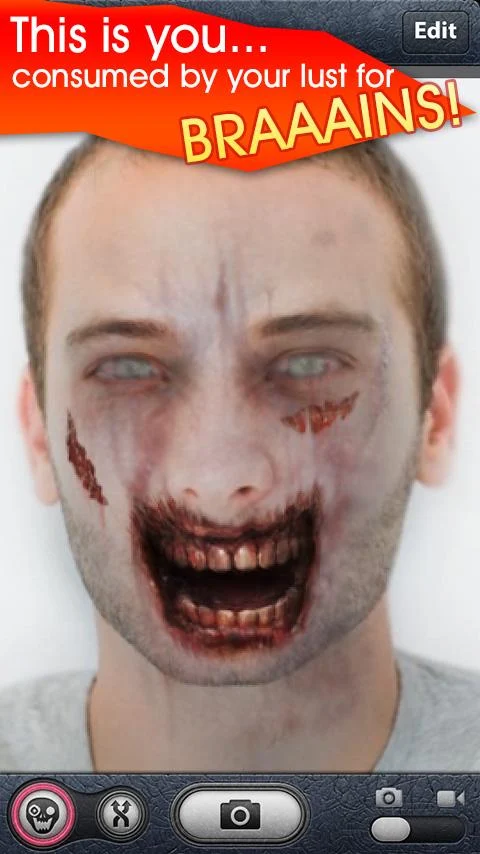
ZombieBooth


Description
How would you look as a zombie?! What about your friends?
ZombieBooth is a fun way to instantly make your face into a 3D, animated zombie!


CUSTOMIZABLE 3D ZOMBIES!
- ZombieBooth makes any 2D portrait fully 3D
- Create a huge collection of 3D, animated zombies from photos of you and your friends
- Choose from several zombie variations to pinpoint your undead doppelgänger
YOUR ZOMBIES COME ALIVE
- Zombies will blink, scowl, and breath!
- Hear them growl and frenzy
- They’ll even try to ravage your finger if you get too close!
ZOMBIFY YOUR FRIENDS!
- Capture portraits to zombify on any camera equipped Android
- Share zombie images via Email
For more info, to ask a question directly, or to just share your zombies, come visit us on Facebook (http://www.facebook.com/ZombieBooth) or Twitter @ZombieBooth.

WARNING: This app contains frequent use of horror images that may not be suitable for children or the faint-hearted!

Screenshots:


To Download this APP: CLICK HERE


Saturday, August 24, 2013

[APP][GAME] GameBoid - GBA Emulator for Samsung Galaxy Y


What is GameBoid?
GameBoid is the very famous GameBoy Advance emulator optimized for Android.
Features:
  • BEST compatibility compared to any other GBA emulators running on mobile devices.
  • Run most games at full speed with sound
  • Customizable on-screen translucent keypad
  • Save/Load game states at ANY point!
  • In-game battery save
  • Cheats
  • Fast-forward (turbo)
  • Switching between multiple key profiles
Note:
yonghz is making this app free for download only for a limited period of time (eg. 2 weeks) to make already-paid Android Market customers happy. Thanks for the understanding!

Download:
  1. GameBoid - http://www.mediafire.com/?0qj1obpkxyrpxjq
  2. GBA Bios -  http://www.mediafire.com/?0j7oru1fowosgsn
  3. GBA ROMs - (4 Links only :P. If you don't like the 4 links find yourself)
Instructions (For New Users)
  1. Download the GameBoid.apk and gba_bios.bin in the provided link.
  2. Install GameBoid.apk and open it
  3. Now it will warn you that it needs GBA Bios file. Browse it until you see the gba_bios.bin that you have been downloaded. Choose it.
  4. Choose GBA ROM and you can play now :-).
Best Settings for GameBoid
  1. Audio & video settings -> Scaling mode -> Stretched
  2. Input settings -> Virtual keypad settings -> Vibrate on keypress must be unchecked.
  3. Other settings -> Orientation -> Landscape
Now you can now enjoy playing your GBA ROM games. Enjoy!


Sample Images:


Special Thanks to:
Related Posts Plugin for WordPress, Blogger...